Designing a Charming Valentine’s Notebook: A Guide to Creating a Unique Gift
Valentine's Day is the perfect occasion to express your love and appreciation. One thoughtful and creative way to do this is by designing a Valentine Notebook. Whether it's for a loved one, a friend, or even yourself, a beautifully designed notebook can be a cherished keepsake.
Why Choose a Valentine Notebook?
A Valentine Notebook is not just a simple gift; it's a personalized token of affection. It allows you to add a personal touch, making it a unique and meaningful present. Here are some reasons why a Valentine Notebook stands out:
- Personalization: You can tailor the design and content to suit the recipient's preferences and interests.
- Practicality: Notebooks are always useful, whether for jotting down thoughts, planning, or journaling.
- Sentimental Value: A custom-made notebook can become a treasured keepsake, reminding the recipient of your thoughtfulness.
Creating the Perfect Valentine Notebook Interior
The interior of your Valentine Notebook is where you can truly let your creativity shine. Here’s how to create a beautifully designed interior that will make your notebook stand out:
Dimensions and Pages
For a standard Valentine Notebook, consider using the following specifications:
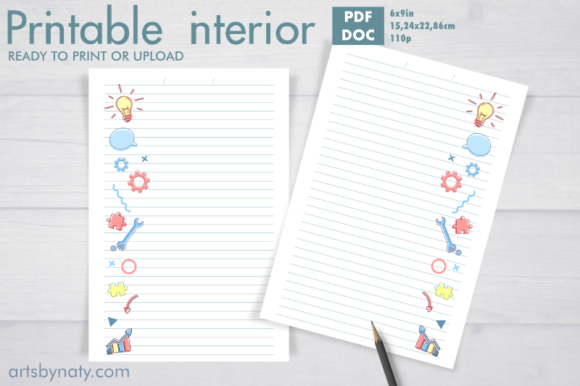
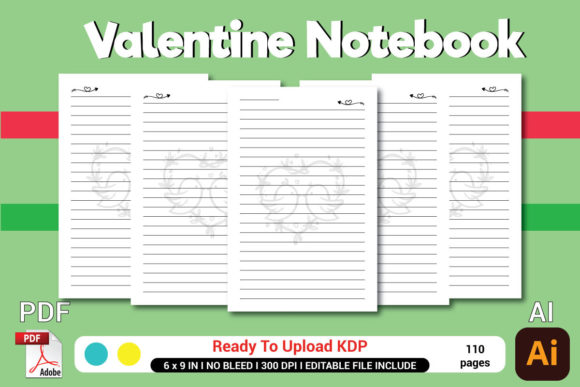
- Dimensions: 6" x 9" inches, which is a comfortable size for writing and carrying around.
- Pages: 110 pages, providing ample space for notes, drawings, and more.
High-Quality Print Ready PDF
To ensure your Valentine Notebook looks professional and high-quality, use a print-ready PDF. This format guarantees that all elements, such as text, images, and designs, are accurately represented when printed. Make sure your PDF is set up with the correct dimensions and page count.
File Formats
When creating your Valentine Notebook, it's essential to have the right file formats. Here are the key formats you should use:
- .AI File: Adobe Illustrator file, ideal for vector graphics and detailed designs.
- .EPS File: Encapsulated PostScript file, another vector format that ensures high-quality printing.
- .JPEG File: For raster images, such as photographs or scanned artwork.
- .PDF File: The final, print-ready version of your notebook interior, ready for upload to KDP.
Designing the Interior Pages
The interior pages of your Valentine Notebook can be designed in various ways to make it visually appealing and functional. Here are some ideas to consider:
Lined Pages
Lined pages are a classic choice for a Valentine Notebook. They provide a neat and organized layout for writing. You can choose from different line styles, such as dotted, dashed, or traditional solid lines. Consider adding a subtle border or decorative elements to the edges of the pages for a touch of elegance.
Blank Pages
If you want to offer more flexibility, include some blank pages. These can be used for sketches, doodles, or pasting photos and mementos. Blank pages also give the recipient the freedom to use the notebook creatively.
Decorative Elements
Incorporate decorative elements that align with the Valentine's Day theme. Use hearts, floral patterns, and romantic quotes to enhance the visual appeal. You can also add small illustrations or icons at the corners of the pages to make them more engaging.
Adding Special Touches
To make your Valentine Notebook even more special, consider adding some unique features:
Custom Messages
Include a few pages with custom messages or quotes. These can be handwritten or typed, depending on your preference. Personalized messages add a heartfelt touch and make the notebook more meaningful.
Photo Inserts
Create a section for photo inserts. This allows the recipient to add their favorite photos, making the notebook a beautiful scrapbook. You can design these pages with pre-cut slots or adhesive tabs to hold the photos in place.
Special Sections
Consider adding special sections, such as a "Bucket List," "Dreams and Goals," or "Memories." These sections can help the recipient reflect and plan, making the notebook a valuable tool for personal growth.
Preparing for KDP Upload
Once your Valentine Notebook interior is designed and ready, you need to prepare it for upload to KDP (Kindle Direct Publishing). Here are the steps to follow:
- Finalize the Design: Review your design to ensure it meets all the requirements and looks perfect.
- Export the Files: Export your files in the required formats (AI, EPS, JPEG, PDF).
- Check the PDF: Open the PDF file to verify that all elements are correctly placed and there are no errors.
- Upload to KDP: Log in to your KDP account and follow the instructions to upload your files. Make sure to select the correct trim size and paper type.
Creating a Cover for Your Valentine Notebook
The cover is the first thing people see, so it's crucial to make it eye-catching and appealing. Here are some tips for designing a beautiful cover:
Choose a Theme
Select a theme that complements the interior design. For a Valentine Notebook, themes like hearts, flowers, and romantic colors work well. You can also use a photograph or a custom illustration.
Add a Title
Include a title that reflects the purpose of the notebook. For example, "My Valentine Journal" or "Love Notes." Use a clear, legible font and make the title prominent.
Use High-Quality Images
Ensure that any images or graphics you use on the cover are high-resolution. This will make the cover look professional and attractive.
Test the Cover
Before finalizing the cover, test it in different sizes and formats to ensure it looks good in all scenarios. You can also ask for feedback from friends or colleagues to get a second opinion.
Conclusion
Creating a Valentine Notebook is a thoughtful and creative way to show your love and appreciation. By carefully designing the interior and cover, you can produce a beautiful and meaningful gift. Follow the steps outlined in this guide to make your Valentine Notebook a cherished keepsake. Happy designing!